Through the lens: An architect in the computing world – Five principles

Architect – a person who designs and in many cases supervises the construction/delivery of their design, usually based on the requirements of a customer

I have always wondered what is required to be an architect. While technical and functional skillset is the base for any architect, there must be a few other guiding principles that can help an architect to deliver what the customer wants. Today, there are many who have sound technical knowledge, have the best domain expertise, have an excellent skillset in articulation, and have great interpersonal skills. But very few can give the customer, what they want.

Yes, the customer is king, but an architect has to deliver the best possible solution for the customer based on the customer’s pre-set parameters.

So, it’s more of we deliver what the customer wants, but in a way that we believe is the best. While our expertise may lead us to design something we feel the best (and be reluctant to accommodate a customer’s request), always remember that the customer pays!. Dollar bills!. You see, there is a middle ground – Deliver the best but/and make sure the customer is happy.

One of my recent involvements, made me rethink the non-technical, non-functional qualities an architect needs. These are definitely not interpersonal skills, So I will leave it to the reader to classify them. I think these are general guidelines that any project or any architect usually follows, so maybe it can act as a recap or reminder to all of us – architects. These are my five principles, I’m sure everyone may not agree to it, but here you go!

1. Show them what you do

On a high level for an enterprise-wide project, these are the phases involved. – Discovery, Solution Modelling, Build, Test, Go-Live. While each of the phases has its own deliverable to mark the completion of the phase, the time they take is usually high.

Imagine that you are building a house and spending millions of dollars. Won’t you expect to see the progress of the house every now and then? Will you accept your engineer/architect/contractor to just give you weekly info on what they did? I won’t. I will want to see what they have done for each week.

A customer who pays for the solution they need will need to see what has been done periodically.

Note the emphasis on ‘See’.

As part of the build and test phase, you can obviously show the solution that is being built (Classroom Pilots / Demos, etc.,), but what will you do in the lengthy discovery or solution modeling phases (apart from the final design or blueprints given at the end of the phase)? Believe me, capturing/elaborating requirements in a tool like Jira or ADO is a minimum activity now. Large / Multi-national enterprises, usually have all their requirements well written with their own Business Analysts / Users. So what else we can do to act as a differentiator?.

  1. Minutes: Let’s start with the basics – Send ‘Minutes’ for your meetings and time spent.
    • MoM as we usually refer needs this basic information – Topics Covered, Participants, Discussion Minutes, Decisions Taken, and Finally Next Actions with appropriate ETAs/ Follow-Up dates
  2. Present what you understood: (Ah yes, Whiteboarding) How about a simple diagram, an algorithm, a flowchart, an architecture, a PowerPoint smart art, or a simple cross-functional diagram?
    • Having a lengthy discussion on the customer’s process needs a definite output and it has to be immediate/quick. MoM will be a mandatory output, but your differentiator is going to be a pictorial representation of what was discussed.
    • I usually prefer putting together diagrams / writing down algorithms during the discussion with my screen shared (or on a whiteboard if it’s an in-person discussion). (Recently a friend shared with me a neat trick to create sequence diagrams with UML. I’m a fan of that now). This helps me with the below
      • Saves Time (Yes, a lot!!). I can just reuse this for my MoM or even in future deliverables
      • Helps me not to forget the nitty gritty.
      • Gives a chance for the customer to validate our understanding on-the-spot
      • Finally, it gives a minor satisfaction to the customer that we are making sense of their process!

Tools I use – OneNote (A big fan), Notepad, Any online UML Sequence Diagram, PowerPoint, Visio.

2. Stop selling, start delivering

This typically applies to the delivery phase. Yes, as the phase name suggests, we need to deliver.

The customer has spent millions of dollars to choose a product, get licenses, and then onboard an SI / ISV to implement it for them. Do you think they will be ready to spend more to buy a few more new products/ideas? They seldom do. Usually, their first priority is to see the fruits of their current labor. Maybe after the initial release, they will be ready to go overboard. I have seen customers visibly upset whenever an architect discusses with them a design that needs additional cost via customization, licensing, or products.

  • When should you sell? – Stick to the pre-implementation (RFP, RFI) phase. You can stretch a bit of selling to the discovery phase as well. You can definitely sell after the first go-live or MVP, as the customer would have already seen the benefits of their investment and will be ready to invest more or shall I say, trust you better!.
  • How to design without selling? – You have procured the project based on some assumptions which include cost, effort, timeline, and resourcing. Sticking to this boundary, deliver a solution that can meet the customer’s requirements. If the customer’s requirements cannot be met within your boundary, tell them what is possible based on what has been agreed. This heavily depends on the ‘Scope of Work’. If the ‘SoW’ is not clear, you will need to depend on the effort estimates and go back to your management for support.
    • I believe it is right to tell the customer (read as customer’s project manager) from the start of the solution modeling phase, what is possible within the budget. Yes, they will be irritated with our pushback, but it also helps them understand that we have a boundary. Explain to them the boundary, I have seen many client managers understand this pretty well. (Also, the third principle can help here) Remember, we are not here to sell, we are here to deliver. Selling was done before we got the project.
  • But the solution will benefit from this additional customization and cost, should I not focus on the best solution? Yes, you should focus on the best solution. and hence my third principle!

3. Options, options, options

For any problem, there can be more than one solution.

Always make sure to give multiple options, at least for the complex problems/requirements.

While giving multiple options, make sure to differentiate on these categories as a minimum – Technical Benefits, User Experience, User Interface, Timelines, Maintenace, and finally cost. Make sure to mention your recommended option for the best solution.

Of course, many of the industry veterans I know, have always suggested going with the single best solution. I think that will work when you are submitting your solution for a proposal, to show your proficiency. But during delivery, you will need to give options (and yes a recommended option among them).

Giving multiple options for a complex requirement will give the below benefits

  • Customer satisfaction – Customer values the effort you have spent to help them decide and build the best possible solution. I have seen many customers personally appreciate providing them with multiple options. It works.
  • Highlighting the effort and cost involved – Yes, you can show the customer which option will fit within your boundaries and which options will need additional effort or cost. This is a polite/professional way of saying what you can do and what you cannot. If the customer is ready for costly options, they will definitely choose.
  • Future Roadmap – You can help the customer define their future roadmap. At the moment, the customer might have a budget only for option 1, but at a future date, they might go for option 2, so your current work can help them to decide the next steps.
  • Knowledge is PowerYes, giving multiple solutions for problems, helps you as well as you usually do some R&D / PoC to get the required information.

4. Own the solution

Owning the solution and delivering it – This is very important for an architect. I have seen many architects who blame the developers/development team for an incorrect / issue-prone solution or delivery. While your role might not have this responsibility in your organization (certain organizations don’t, as they will have a separate development/delivery team), this is required for building an effective solution for the customer. The customer will start trusting you for the next project, only if you deliver what you promised.

  • I don’t have the development under my control/purview, so how can I own the solution? – Work in partnership with the DEV Team / Lead. Try to be in their shoes, as they do the bulk of the heavy lifting for the solution. Understand the effort estimates and stick to the SoW. If you are deviating from the SoW or estimate, make sure your team understands the need for it (The data you prepared for 3rd principle can help here as well). Don’t commit to short timelines or complex designs without their buy-in.
  • My design is based on my experience, and the team fails to understand – Tricky situation that happens in all projects – You have 2 ways: Make them do a PoC to make them understand your point. You can also, if possible, get both solutions developed (of course time/effort wasted) or you should advise them that you will take responsibility for the solution. Yes, I agree, this is a slightly difficult topic that will need better interpersonal skills to manage.

5. Being Neutral (or can we say Integrity?)

A 60-year-old client manager once told me that the important quality they expect in an architect or an SI partner representing an SI / ISV is to give the best solutions regardless of whether it will bring additional business to the SI or additional licenses to their product.

I believe him.

However, it is always better to be neutral. We, architects, are here to deliver the best possible solution for the customer within the boundaries specified to us by both the customer and the organization we work for. We can’t go overboard and that is where principle 2 helps.

  • My organization is expecting more revenue, I can’t do that by being Neutral or by practicing integrity You can do both at the same time. Read principle 3.
  • My customer is expecting more than the effort or cost estimated or SoW. Read principle 2(which also refers to principle 3).

I believe these five principles will help any budding architect or a functional consultant.

Well, here we are at the end of my post. This is my view based on my experience. Do comment on your thoughts/ideas. Happy architecting.

Cheers.

Xbox Series S – How does it fair in an Indian Broadband setup?

Disclaimer – I’m a casual gamer (Few hours per day / very basic set of games). So my views expressed here might not be applicable for hard-core gamers.

My primary objective was a console to play few games for me and my family, secondary is for entertainment by using various apps for music / videos / OTT subscriptions.

I was impressed by the form factor and the ability of the Xbox Series S digital console.

I did research by reading all reviews from different web sites, youtuber reviews and was a little skeptical while buying it, as most of them mentioned the need for a good broadband connection, the need for a costly custom pluggable SSD, the absence of disc drives and the absence of native 4K. However, I couldn’t try out the console before buying it due to various reasons, one among them is the pandemic and associated lockdowns.

So finally, I took a leap of faith on Microsoft and ordered my console from Amazon. It was very easy to setup and occupied very less space.

Figure 1: Xbox Series S

Now, let’s come to the topic of my post. Will Xbox Series S fit in an Indian Broadband Landscape?

Before I try to answer this, here is my setup

  • I have a Fiber Broadband offering 200 Mbps unlimited speed. I’m paying around 1100 per month
  • I have the Junction box (or technically called as Optical Network Terminator) installed at my house premise (So can I say the latency is better?)
  • From the ONT, I have a TP-Link Router given by the ISP. I have a wired access point to another TP-Link Router.
  • This wired access point provides the WiFi for the console (Yes, I don’t have a wired connection 😦 )
  • I usually have at least 7 heavy bandwidth usage devices connected in-parallel using the internet for video streaming / video calls / cloud programming along with 4 to 5 normal bandwidth usage by mobiles / IoT devices

This is what I did to try and find the answer:

  • Subscribed to Xbox Game Pass (You can obviously buy one or two games. Option is still available)
  • Downloaded and started playing below games (Yup, took some time for the downloads. But it was onetime setup, so no complains)
    • Jurassic World – Evolution
    • Star Wars – Squadrons
    • Scream Ride
    • Zoo Tycoon
    • MotoGP 20
    • Ace Combat 7
    • UFC 2
    • NFS Heat
    • Rocket League
    • Descenders
    • Cities: Skylines
    • Forza 7
    • FI
    • PUBG
  • Ofcourse Apps like
    • Netflix
    • Prime
    • Youtube
  • Once I finished a game or didn’t like it, I did uninstall it to save space. But I never felt like the space was less at any point

Here is my conclusion…

Xbox Series S was able to play all the above games with no buffering / lags or any performance issues.

The console works perfectly for a casual-gamer like me.

The broadband connection I have is more than sufficient for my gaming despite the parallel bandwidth usage by other devices (and console was connected via WiFi)

The ‘Instant Resume’ feature is awesome. I don’t remember waiting for any game to load even if I switch between multiple games / apps

I didn’t care about the native 4K resolution. Yes, upscaling is enough for me.

The lack of disk drives or the need for additional SSDs didn’t arise for me yet

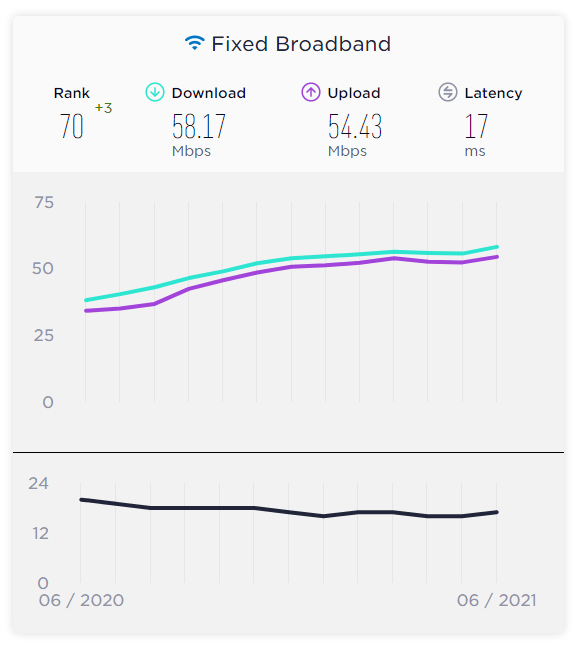
Having experienced a good performance from my console, I started checking how good the Indian Broadband scene is compared to the whole world. This is what I could find. Thanks to SpeedTest / Ookla for their insights.

Figure 2: SpeedTest’s data for India’s broadband scene

While the average speed is 50 Mbps in India, if you have multiple clients like I have, I suggest a minimum of 100 Mbps connection for Xbox Series S.

There you go –> Xbox Series S does fit the Indian Broadband Scene, just need to identify the correct setup.

Do comment your ideas / thoughts. Happy Gaming.

Cheers!

Windows 11 in Hyper-V : Things to watch out

Windows 11! the new release from Microsoft has all the things that can make even a regular user to be excited about.

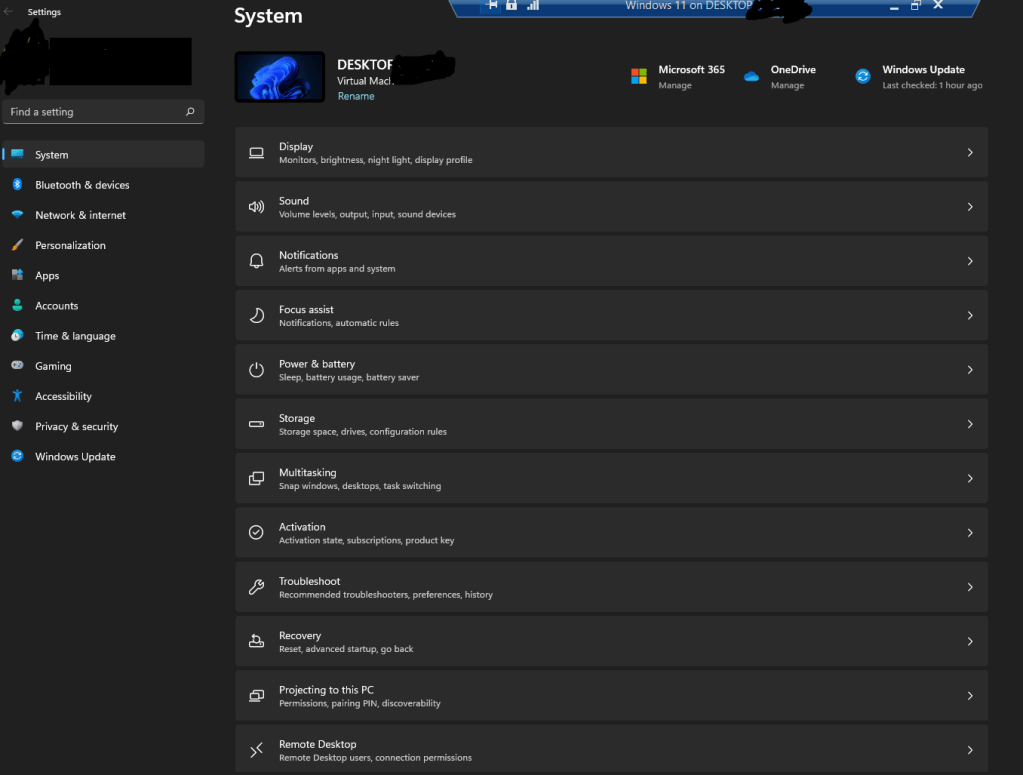
My favorite feature is redesigned ‘Settings’ app. It resembles the mobile settings of Android / Your Phone app UI and yes, its awesome.

Figure 1 – Windows 11 – Settings App

I did my setup in a Hyper-V VM. Upgraded an existing Windows 10 VM to 11 by joining the Windows Insider Program in the DEV Channel.

There are many blogs that gives you step by step insight into setting up the Windows 11 machine in Hyper-V. While, I didn’t refer any of the below as it’s pretty straight forward, do check if you need any help. This ‘Windows Central’ link is very detailed enough.

How to try Windows 11 alongside Windows 10 using a virtual machine | Windows Central

In this post, I would like to share my learnings…

  • Storage – Make sure your main Virtual Disk is minimum 35 GB. Anything less than this, you will have a hard time managing the windows updates. Yes a rookie mistake from my side. I had setup C: drive for 30 GB and had to play it safe by clearing temporary files , windows installation files etc., often. (Windows Central has mentioned a generous 65 GB. Yeah that will be enough for using Windows 11 even as your daily driver, if you like me believe in cloud storage).
  • Maximizing the window size – Once you install Windows 11 in your VM and if you, like me, use a large monitor, you will see issues when you use an ‘Enhanced Session’ in the VM or try to change the VM window display size by using the slider of the VM properties. The VM will not even show you the login screen (at least for me). So instead of changing the VM Settings, login to Windows 11 and change the ‘Display Settings’. Here choose the right resolution you need (Best to match to resolution of the desktop / laptop that hosts the VM) and viola!.
Figure 2 – Changing Display Resolution

That’s it from my side. If I observe any other issues in my VM, I will update this post.

Enjoy Windows 11. Hopefully I will soon get my hands-on Windows 365. Excited!

Cheers.

Dynamics 365 CE – Using Security Groups – How many do I need? Can I nest them?

The latest feature in Dynamics 365 CE (and PowerApps), is to provide user access to an environment using AAD Security Group or Microsoft 365 Groups.

This is a wonderful feature for IT admins as they don’t need to deep dive into the security model of Dynamics 365 CE / Power Platform for doing a day to day task of handling the typical ‘User Provisioning’ tickets, especially in organizations where they have lots of systems to handle.

Once the system integrator / IT partner builds the system with required business units, teams and roles, all the IT admin has to do is to add the user to the required group to give the requested roles / access.

Below Microsoft Docs articles will help you to understand the basics, before we go ahead.

  1. Different types of groups : Compare groups – Microsoft 365 admin | Microsoft Docs
  2. How to create a basic group in AAD: Create a basic group and add members – Azure Active Directory | Microsoft Docs
  3. How to add a group as a team in Power Platform / D365 CE: Manage group teams – Power Platform | Microsoft Docs
  4. How to add a group to an Environment during creation: Create and manage environments in the Power Platform admin center – Power Platform | Microsoft Docs

However, what is the best way to setup these groups? These are the questions that I had when I started using this setup:

  1. How many security groups do I need?
  2. Can I have nested security group. Is that easier to setup and use?
  3. Will the changes to a security group used by D365 reflect immediately?

Let me try to answer them based on my understanding…

How many security groups do I need for an environment?

To answer this question, I took the liberty of classifying the groups into two based on where / how they are used. I also named them as below

  • Environment Security Group: This security group is used in the ‘Create an Environment’ procedure to set the users who will have access to an environment.

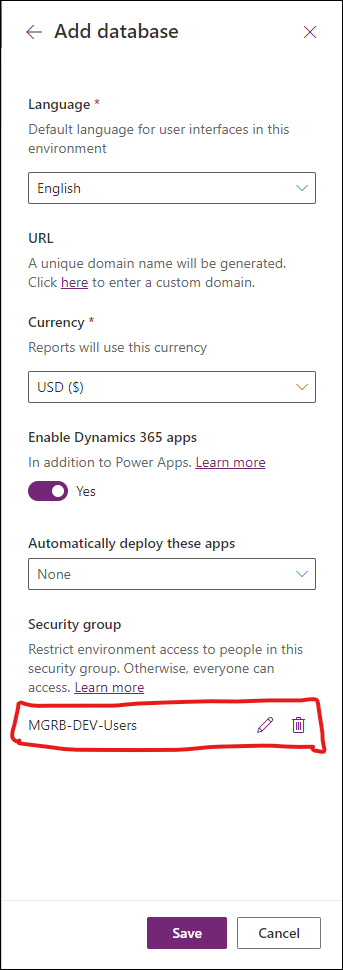
Let us assume the environment we are going to use is ‘MGRB – Development’. Our goal is to allow only developers and testers to access this environment. So we will create a group as ‘MGRB-DEV-Users’ which stands for ‘Users of MGRB Development Environment’. We will then add the developers as the members of this group. While setting up the environment, we will choose the group in the ‘Security Group’ field as shown below.

Figure 1: Environment Security Group used to restrict environment access
  • Role Specific Group: This security group is used to provide a specific role to the members of the group in the associated environment.

In the above mentioned example, while the members were added to the group and were set as the security group for accessing the environment, they still won’t be able to access the environment. Yes, you guessed it right. They need a security role!

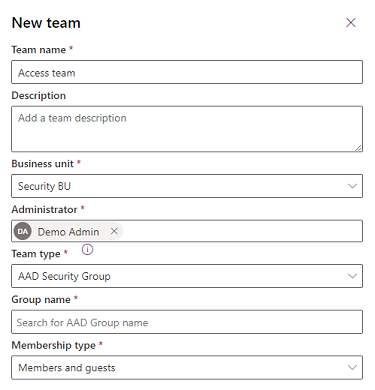
There can be multiple users in the Environment Security Group – MGRB-DEV-Users, but our goal is that only developers can be with ‘System Administrator’ role. To fulfill this goal, we will now have one more group as ‘MGRB-DEV-Admins’. This group is then created as a group team in Dynamics 365 CE / Power Platform.

New Azure AD team
Figure 2: Adding MGRB-DEV-Admins as a Group Team – Role Specific Group

So, if we have additional roles, then we will one group per role and we can call it as ‘Role Specific Group’.

Here is our conclusion:

Environment Security Group and Role Specific Groups will work together to provide an user, access to an environment.

A user who is present in an ‘Environment Security Group’ should also be part of at least one ‘Role Specific Group’.

What about nested security groups?

Nested security groups do work in Dynamics 365 CE / Power Platform. However, I suggest my IT admins to avoid using nested security groups for below reasons

  • Easier auditing / reporting – I prefer having individual security groups, as it gives me clear information on who is part of which environment and has what role. Instead of spending time to dig into each nested group to get the required report, if needed for any auditing purpose.
  • Easier to remove access – A user can be part of more than one ‘Role Specific Group’. It is always easier to remove a user from an Environment than removing them from all roles (also make setting them again easier. Yes, users may take a Sabbatical, change location, region etc.,)

Will the changes to a security group using by D365 reflect immediately?

Nope. It won’t reflect immediately. You will need to ask the user to log out of all browsers and login again to Power Platform / D365 CE. Learnt it the hard way.

Well, here we are at the end of my post. This is my preferred way of using the security groups in D365 CE / Power Platform. Do comment your thoughts / ideas.

Cheers.

PP : Check logged-in user security roles

Product: Dynamics 365 CE, Model Driven Apps
Language: JavaScript

Doing an operation based on the logged-in user’s security roles is a common requirement is any Dynamics / PowerApps implementation. Here is a simple code, that you can re-use to do any activity based on user’s role.

For this example, I have taken a scenario of hiding / showing a tab in a form based on specific roles.

function showTabsByRole(executionContext)
{
   // Function to hide the  appointments tab by role
	"use strict";
    var formContext = executionContext.getFormContext();
	var roleCollection;
	var rolesVisibleFor = ["System Customiser", "System Administrator"];  // Replace this with the role you need
	var shouldBeVisible = false;
	var userSettings = Xrm.Utility.getGlobalContext().userSettings;
	if (userSettings.roles._collection != null)
	{
		roleCollection = userSettings.roles._collection;
	}
	else return;
	Object.values(roleCollection).forEach(function (obj)
	{
		rolesVisibleFor.forEach(function (item)
		{
			if (obj.name == item)
			{
				shouldBeVisible = true;
                formContext.ui.tabs.get("appointmentstab").setVisible(shouldBeVisible); 
				return;
			}
		});
	});
    formContext.ui.tabs.get("appointmentstab").setVisible(shouldBeVisible); 
}