
The emergence of AI has indeed revolutionized the way tasks are accomplished in various fields. Over the last few months, I have personally experienced the significant impact of AI in my day-to-day work. Its efficiency has played a pivotal role in ensuring that tasks are completed on time, and often even ahead of schedule. This has been instrumental in enhancing productivity and streamlining processes.
I’ve utilized Copilot for a variety of basic tasks. These include crafting chat messages (indeed, what better way to dazzle your superiors with contemporary English?), composing emails, expressing gratitude to my team, offering feedback, drafting documents, designing presentations, and ultimately, developing solutions using Power Platform.
Based on my experience with AI and Copilot, I recently conducted a session highlighting the potential of AI to assist power platform developers and architects in their daily activities.
My session on “Copilot – A day in the life of a developer” followed this agenda

Copilot in your everyday apps
Here, I used the great app-level information provided by Microsoft on this webpage – https://copilot.cloud.microsoft/en-US/prompts. I added a few more icons that I thought were missing on this page. I’m sure many other products have Copilot embedded into them.
Refer to this link on how Microsoft Copilot is better and different – ChatGPT vs. Microsoft Copilot: What’s the difference? – Microsoft Support

The art and science of Prompting
The age of Internet search engines is now replaced by AI. The better the prompt is, the greater the response from Copilot.
My take on prompting involves prompts by two kinds of people –
1. One who doesn’t know what they want.
2. One who knows something and needs more things to be done.
For the first kind, Copilot will act as a mere search engine. You ask a basic question, and it gives the details. It’s for the second kind, that the magic of Copilot is demonstrated and it is also possible only if you understand the science of prompting.
Microsoft talks about the science of prompting in this page – https://aka.ms/copilot/prompt_toolkit?ocid=copilotlab_smc_article_gettips
To summarize, a prompt should have this basic information
- Goal – What response do you want from Copilot?
- Context – Why do you need it and who is involved?
- Source – Which information sources or samples should the copilot use?
- Expectations – How should Copilot respond to best meet your expectations

What you can do with Microsoft Copilot?
For this particular topic, I used the toolkit given by Microsoft. It gave many scenarios that you can try out. Do check out the copilot lab link and copilot adoption kits for more information.
https://adoption.microsoft.com/en-gb/copilot/
https://adoption.microsoft.com/en-gb/copilot/success-kit/
Below screenshot is one such example

A day in the life of a power platform developer
I used a requirement about encrypting data using HMAC SHA 256 for my demo on ‘Microsoft Copilot – A day in the life of a power platform developer’. (As I didn’t use MS Team’s Recap or Transcript Feature, here I’m giving a summary of the demo!)
A developer or an architect does the below in their day-to-day life:

- Research – The architect/developer gets a requirement from the client. First, they will need to do basic research. You can obviously do this using Copilot for Web, Mobile Apps, and Copilot for Edge. Again this involves the ‘two kinds of people’ that I mentioned in the previous topic. You can ask Copilot for Edge to
- Search for a topic
- Summarize a webpage
- Take a screenshot of the webpage table or diagram and ask Copilot to summarize it in text.
- Share – Once they have sufficient information, they have to share it crisply and clearly back to the customer/client. You can achieve this by using Copilot in Outlook. Give the content and ask Copilot to summarize it
- Present – This is obvious. You can use Copilot in PowerPoint to create slides based on the content that you share as the source. Unfortunately in my experience, Copilot for PowerPoint didn’t give me a great output. Maybe, I didn’t master the art of prompting!
- Document – This is my best use case of Copilot. Copilot for Word can generate pages of the content that you need. In my demo, I asked it to create a technical specification document for the encryption logic with an algorithm, test cases, and even a sample javascript code!. Believe me, it was like magic! I think this is one use case that every developer and every architect needs to embrace!
- Implement – For this, I used multiple copilots. I started with a simple javascript by using Copilot for Windows and then used Copilot for Power Pages to tailor the script to work for Power Pages. I then changed the JavaScript to C#.net code that can work as a proper Dataverse Plugin using Copilot for Windows (of course you can try Github Copilot as well). Finally, I built the same logic in Power Automate using Copilot for Power Automate. I also built a simple canvas app to view the source and encrypted data in tables using Copilot for PowerApps.
What have we learnt and what’s next?
Microsoft Copilot is indeed a powerful tool with numerous potential applications in our daily routines. Its ability to assist with code generation and provide insightful suggestions is truly remarkable. As technology continues to advance, it’s exciting to consider the many ways in which tools like Copilot can streamline our tasks and enhance productivity.
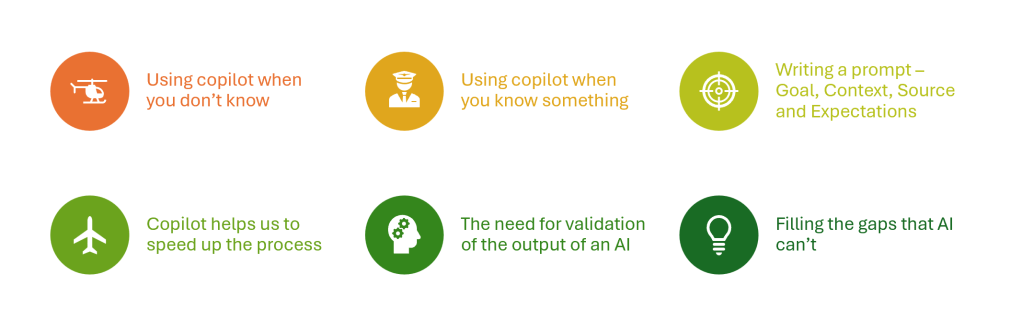
I’ve dabbled with Copilot in a slew of my daily grind, but boy, have I been roasted a few times! 😄 From swiping the ‘hello’ from rephrasing suggestions for texts and emails to spouting off facts without double-checking—yep, I’ve seen it all. These AI mirages and my own ctrl+C, ctrl+V blunders? They’re like those spicy life lessons. But hey, they’re seasoning me to be an AI-whisperer!
AI is set to revolutionize the development process by slashing the time needed to create plugins, Power Automate flows, or Power Pages from 8 hours down to just 1. However, the ingenuity of the human mind remains indispensable for crafting the right prompts and integrating the components to produce the intended result.
For now, as we evolve, our jobs are safe. Yes, for now!
 mgrb
mgrb 