Disclaimer – I’m a casual gamer (Few hours per day / very basic set of games). So my views expressed here might not be applicable for hard-core gamers.
My primary objective was a console to play few games for me and my family, secondary is for entertainment by using various apps for music / videos / OTT subscriptions.
I was impressed by the form factor and the ability of the Xbox Series S digital console.
I did research by reading all reviews from different web sites, youtuber reviews and was a little skeptical while buying it, as most of them mentioned the need for a good broadband connection, the need for a costly custom pluggable SSD, the absence of disc drives and the absence of native 4K. However, I couldn’t try out the console before buying it due to various reasons, one among them is the pandemic and associated lockdowns.
So finally, I took a leap of faith on Microsoft and ordered my console from Amazon. It was very easy to setup and occupied very less space.

Now, let’s come to the topic of my post. Will Xbox Series S fit in an Indian Broadband Landscape?
Before I try to answer this, here is my setup
- I have a Fiber Broadband offering 200 Mbps unlimited speed. I’m paying around 1100 per month
- I have the Junction box (or technically called as Optical Network Terminator) installed at my house premise (So can I say the latency is better?)
- From the ONT, I have a TP-Link Router given by the ISP. I have a wired access point to another TP-Link Router.
- This wired access point provides the WiFi for the console (Yes, I don’t have a wired connection 😦 )
- I usually have at least 7 heavy bandwidth usage devices connected in-parallel using the internet for video streaming / video calls / cloud programming along with 4 to 5 normal bandwidth usage by mobiles / IoT devices
This is what I did to try and find the answer:
- Subscribed to Xbox Game Pass (You can obviously buy one or two games. Option is still available)
- Downloaded and started playing below games (Yup, took some time for the downloads. But it was onetime setup, so no complains)
- Jurassic World – Evolution
- Star Wars – Squadrons
- Scream Ride
- Zoo Tycoon
- MotoGP 20
- Ace Combat 7
- UFC 2
- NFS Heat
- Rocket League
- Descenders
- Cities: Skylines
- Forza 7
- FI
- PUBG
- Ofcourse Apps like
- Netflix
- Prime
- Youtube
- Once I finished a game or didn’t like it, I did uninstall it to save space. But I never felt like the space was less at any point
Here is my conclusion…
Xbox Series S was able to play all the above games with no buffering / lags or any performance issues.
The console works perfectly for a casual-gamer like me.
The broadband connection I have is more than sufficient for my gaming despite the parallel bandwidth usage by other devices (and console was connected via WiFi)
The ‘Instant Resume’ feature is awesome. I don’t remember waiting for any game to load even if I switch between multiple games / apps
I didn’t care about the native 4K resolution. Yes, upscaling is enough for me.
The lack of disk drives or the need for additional SSDs didn’t arise for me yet
Having experienced a good performance from my console, I started checking how good the Indian Broadband scene is compared to the whole world. This is what I could find. Thanks to SpeedTest / Ookla for their insights.
- India’s Mobile and Broadband Internet Speeds – Speedtest Global Index
- Speedtest Global Index – Internet Speed around the world – Speedtest Global Index
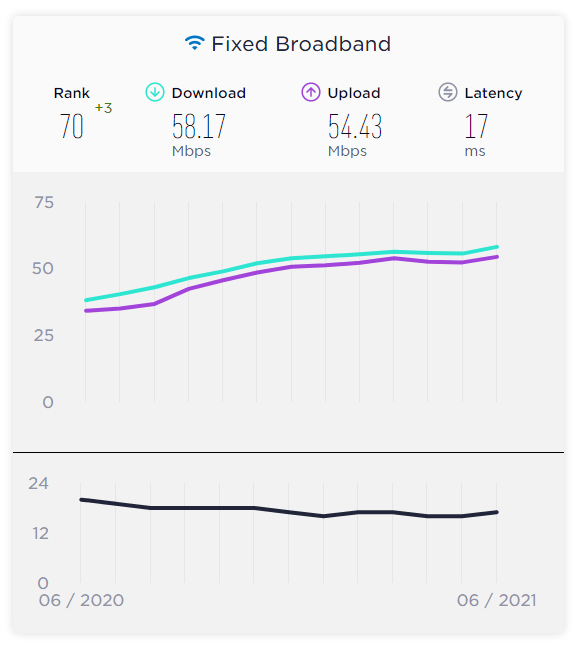
While the average speed is 50 Mbps in India, if you have multiple clients like I have, I suggest a minimum of 100 Mbps connection for Xbox Series S.
There you go –> Xbox Series S does fit the Indian Broadband Scene, just need to identify the correct setup.
Do comment your ideas / thoughts. Happy Gaming.
Cheers!
 mgrb
mgrb 